What AccessCore is & how it's organized
Who this is for — you've just signed up (or you're about to) and want the lay of the land before touching anything.
AccessCore is the billing engine for internet operators — hotspots, WISPs and small ISPs. You run the network; AccessCore handles who has paid, who gets online, and for how long. Five minutes here and the rest of the console will feel obvious.
The five pieces, in plain words
Your workspace is your business inside AccessCore. Your devices, plans, customers and money live in it, under your brand — separate from every other operator on the platform.
Devices are your network hardware — MikroTik routers, RouterOS 6 and 7. You connect each one once, and from then on AccessCore tells it who is allowed online. Your customers keep working on any of your devices — sign-in is central, not per-device.
Plans are what you sell: a name, a price, how long it lasts, how fast it goes, and (optionally) how much data it includes. A plan can be a WiFi day pass, a monthly home line, or anything between.
Customers are the people who buy those plans — named subscribers with a login (home and office lines), or walk-up WiFi buyers who just pay and connect.
Vouchers are prepaid codes for a plan. Print them, sell them at a counter or through agents, and the buyer types the code on your WiFi page to get online. No app, no account needed.
Tying it together is your portal — the page customers see when they join your WiFi. It carries your name, your logo and your colors, and it's where they buy, enter vouchers, and reconnect.
How the console is laid out
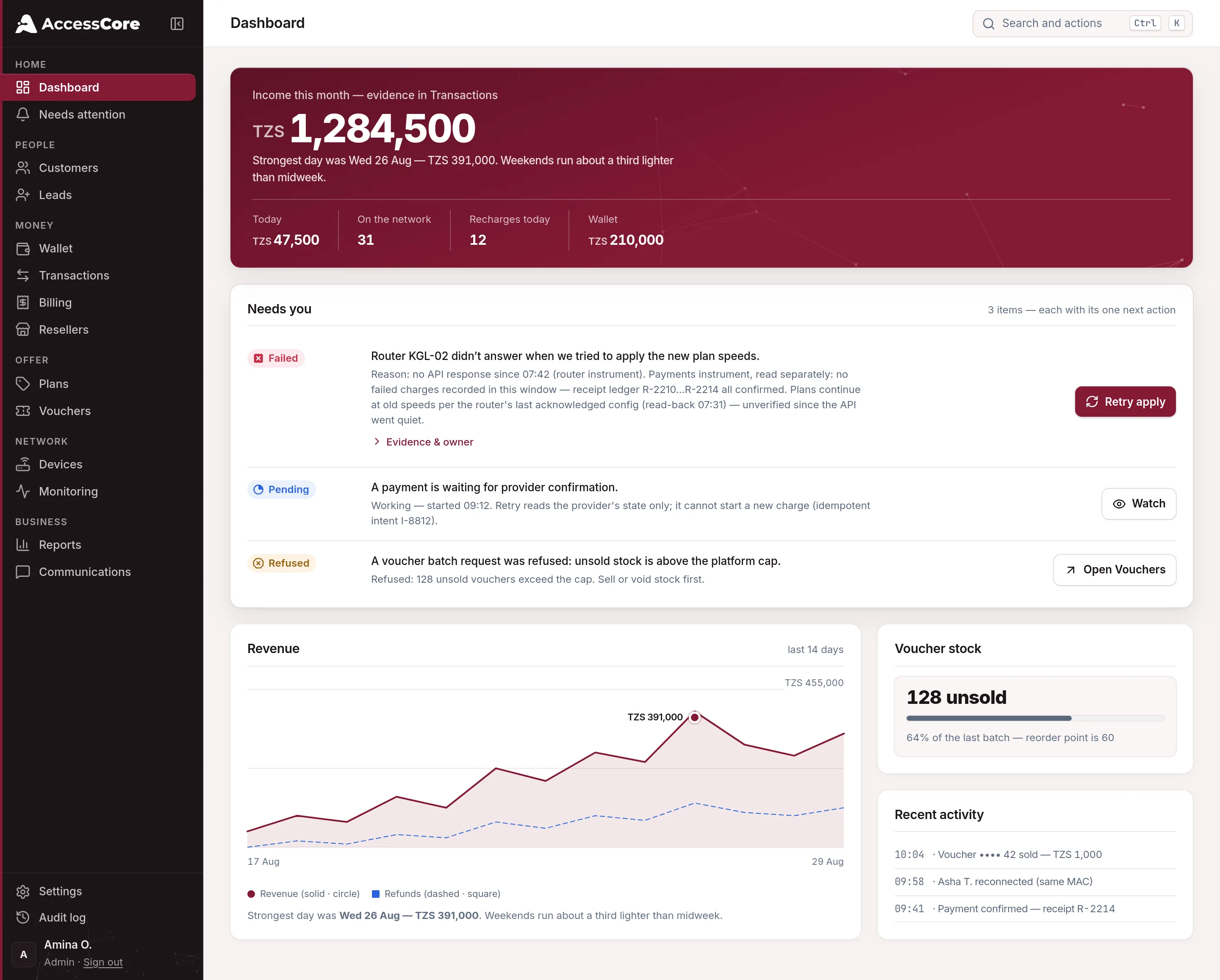
Everything hangs off the left sidebar, grouped the way you'll actually work:
What the pictures depict. The console images on this page are captures of design boards, and they show an operator’s rail: six groups. Your own rail is built from what your role can reach — an owner or admin also sees Sales (Field desk) and Services (Recover access code), which is the eight groups listed below. Same console, fewer keys.
- Home
Dashboard is your day at a glance; Needs attention is the short list of things worth your time; Alert inbox keeps every alert the console raised.
- Money
Wallet is your account with AccessCore — what you've used and your balance; Billing, Transactions and Credit notes are the money you take; Resellers manages agents who sell for you.
- People
Customers holds every account; Leads collects people who asked for a connection; Map shows where they are.
- Sales
Field desk is the counter and agent view — sell, renew and look things up without the full console.
- Offer
Plans is what you sell; Vouchers is your prepaid stock.
- Services
Recover access code finds a buyer's code again when they lost it.
- Network
Devices is your network hardware; IP pools manages addresses; Monitoring watches health.
- Business
Reports for numbers, Audit log for who-did-what, Settings for branding, payments and everything else, Communications for the messages you send, and Team & access for who may do what.
Your first hour: the setup guide
On a fresh workspace, the dashboard shows a Set up your business guide. Each step checks itself off as you complete it — there's nothing to tick manually:
- Connect a device
"Link your MikroTik or other device so customers can get online."
- Create a plan
"Define what you sell — speed, validity and price."
- Activate a payment method
"Turn on mobile money, card or manual payments."
- Brand your portal
"Your name, logo and colors on the page customers see."
- Make your first sale
"A voucher redemption or portal purchase — the moment it all works."
Good to know — you start on a free allowance and only ever pay for what you use. Your customers' service is never tied to your balance with us. The details live in Your account, billing & how AccessCore charges you.
What success looks like
- You can say what a device, a plan, a customer and a voucher each do — in one sentence.
- You know where the eight sidebar groups live and what belongs in each.
- The Set up your business guide is on your dashboard, ready to walk you through the rest.
Write to [email protected] — a person reads every message.